
# @unpic/react
React component for responsive, high-performance images. Generates a responsive
`![]() ` tag that follows best practices, with the correct srcset, sizes and
styles. Detects image URLs from most image CDNs and CMSs and can resize images
with no build step.
## Features
- Just an `
` tag that follows best practices, with the correct srcset, sizes and
styles. Detects image URLs from most image CDNs and CMSs and can resize images
with no build step.
## Features
- Just an `![]() ` tag! No extra elements, no runtime JavaScript. Easy to style.
- Automatically generates correct srcset and sizes attributes for responsive
images
- Handles responsive resizing of images, preserving aspect ratio
- Uses native lazy loading and aync decoding for offscreen images
- Handles different image layouts: fixed, constrained and full width
- Uses eager loading and high priority fetching for important images
- Delivers modern image formats, including WebP and AVIF if supported by your
browser
- No built step or server-side rendering required: uses your existing image CDN
or CMS, with no additional configuration
- Uses [unpic](https://github.com/ascorbic/unpic) to support most image CDNs,
including Cloudinary, Imgix, and Shopify
- Can generate a low-res background image for a blurred placeholder effect
## Installation and usage
```bash
npm install @unpic/react
```
```tsx
import { Image } from "@unpic/react";
function MyComponent() {
return (
);
}
```
For the supported props, see [the docs](https://unpic.pics/img/react).
## Unpic for Next.js
If you are using Next.js, you can use the `@unpic/react/nextjs` component. This
works the same as the main `@unpic/react` component, but also supports the
Next.js Image Optimizer for images that don't use a supported CDN. This includes
local images, either using a path or an import.
### Usage
The component is part of the `@unpic/react` package, so you install it in the
same way:
```bash
npm install @unpic/react
```
Then, in your Next.js project, import the component from `@unpic/react/nextjs`:
```tsx
import { Image } from "@unpic/react/next";
import logo from "../public/logo.png";
// You can use both local images, and ones from image CDNs
<>
;
;
```
> ⚠️ For versions of Next.js before 13.5, import from
> `@unpic/react/next-legacy`, not `@unpic/react/nextjs`
### Differences from `next/image`
The `@unpic/react/next` component is similar in concept to `next/image`, and can
use the same image optimizer. However, it has a number of differences that may
mean you prefer to use it instead.
When unpic-img detects that you are using a supported CDN it will load the
images from there directly, using the CDN's own image resizing rather than
Next.js. This saves the need to process the image twice, and means that you can
use the more powerful features of the image CDN.
Unlike `next/image`, unpic-img will not distort the image to fit the requested
size as it uses `object-fit: cover` by default, and if using a supported CDN it
will crop the image to the requested aspect ratio.
There is no need to specify a loader, because unpic-img will automatically
detect the CDN and use the correct loader, and supports many more than Next.js.
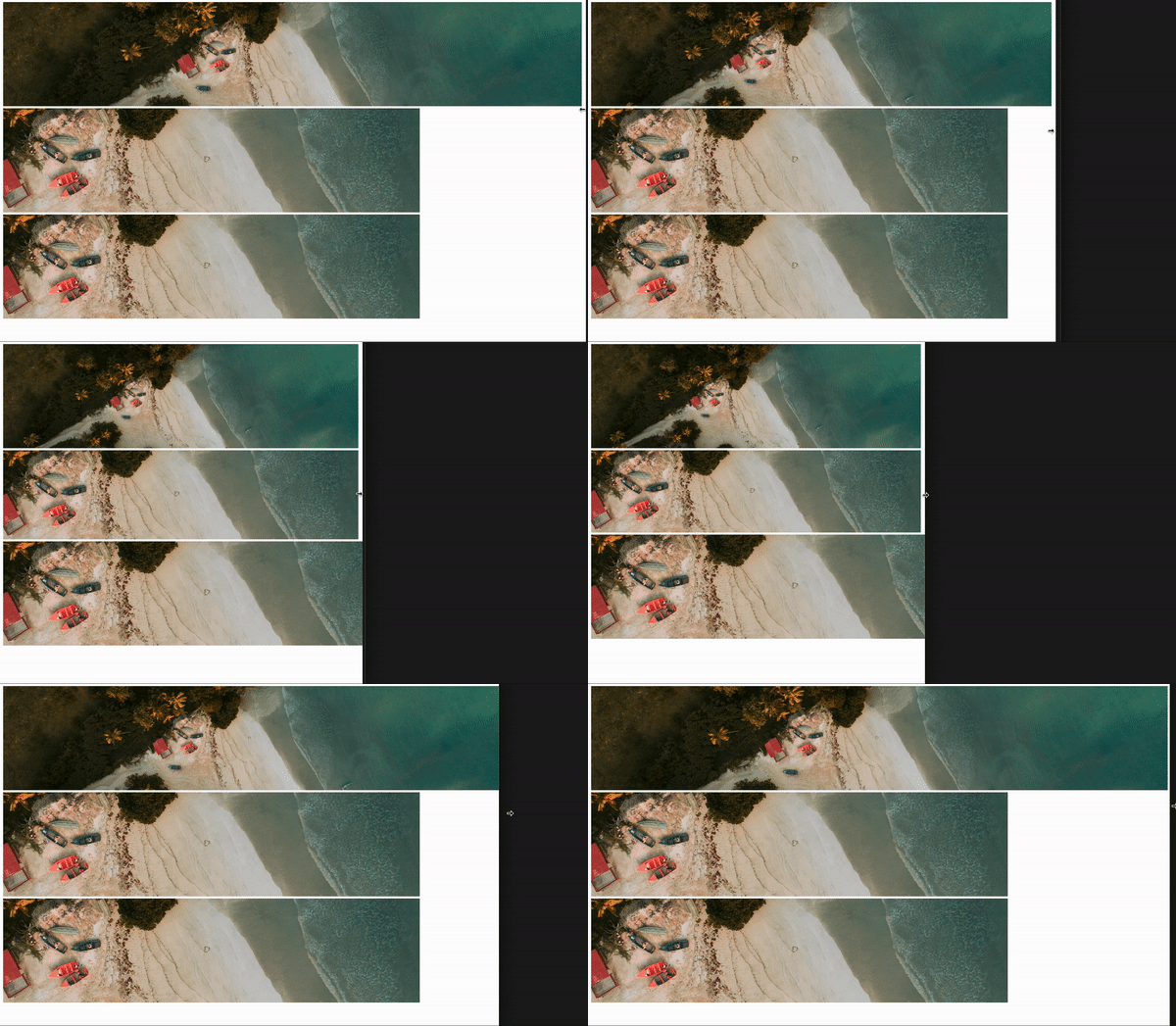
unpic-img includes three built-in layout modes: `fixed`, `constrained`, and
`fullWidth`. These affect how the image resizes, but also allows smarter
generation of the `srcset` and `sizes` attributes. See below for an example:
```
```
` tag! No extra elements, no runtime JavaScript. Easy to style.
- Automatically generates correct srcset and sizes attributes for responsive
images
- Handles responsive resizing of images, preserving aspect ratio
- Uses native lazy loading and aync decoding for offscreen images
- Handles different image layouts: fixed, constrained and full width
- Uses eager loading and high priority fetching for important images
- Delivers modern image formats, including WebP and AVIF if supported by your
browser
- No built step or server-side rendering required: uses your existing image CDN
or CMS, with no additional configuration
- Uses [unpic](https://github.com/ascorbic/unpic) to support most image CDNs,
including Cloudinary, Imgix, and Shopify
- Can generate a low-res background image for a blurred placeholder effect
## Installation and usage
```bash
npm install @unpic/react
```
```tsx
import { Image } from "@unpic/react";
function MyComponent() {
return (
);
}
```
For the supported props, see [the docs](https://unpic.pics/img/react).
## Unpic for Next.js
If you are using Next.js, you can use the `@unpic/react/nextjs` component. This
works the same as the main `@unpic/react` component, but also supports the
Next.js Image Optimizer for images that don't use a supported CDN. This includes
local images, either using a path or an import.
### Usage
The component is part of the `@unpic/react` package, so you install it in the
same way:
```bash
npm install @unpic/react
```
Then, in your Next.js project, import the component from `@unpic/react/nextjs`:
```tsx
import { Image } from "@unpic/react/next";
import logo from "../public/logo.png";
// You can use both local images, and ones from image CDNs
<>
;
;
```
> ⚠️ For versions of Next.js before 13.5, import from
> `@unpic/react/next-legacy`, not `@unpic/react/nextjs`
### Differences from `next/image`
The `@unpic/react/next` component is similar in concept to `next/image`, and can
use the same image optimizer. However, it has a number of differences that may
mean you prefer to use it instead.
When unpic-img detects that you are using a supported CDN it will load the
images from there directly, using the CDN's own image resizing rather than
Next.js. This saves the need to process the image twice, and means that you can
use the more powerful features of the image CDN.
Unlike `next/image`, unpic-img will not distort the image to fit the requested
size as it uses `object-fit: cover` by default, and if using a supported CDN it
will crop the image to the requested aspect ratio.
There is no need to specify a loader, because unpic-img will automatically
detect the CDN and use the correct loader, and supports many more than Next.js.
unpic-img includes three built-in layout modes: `fixed`, `constrained`, and
`fullWidth`. These affect how the image resizes, but also allows smarter
generation of the `srcset` and `sizes` attributes. See below for an example:

```
```